|
Version |
Changes |
Date |
Author |
|
1.0.0.1 |
Initial
plugin release - Windows and Mac OS support |
12/11/2008 |
B.
Straub |
|
1.1.0.0 |
Added
Version property, support for Opera, Chrome, Safari browsers, bugfixes |
09/01/2009 |
R.
Cohn |
|
1.1.0.4 |
Added
info on Windows plugins, URL locations, issues |
09/29/2009 |
R.
Cohn |
|
1.1.0.4 |
Fixed
installer URL |
12/02/2009 |
R.
Cohn |
|
1.1.0.5 |
Added
sub-pixel resolution & tablet position Windows support |
06/17/2010 |
R.
Cohn |
|
|
|
|
|
|
|
|
|
|
The
Wacom Tablet Plugin is a browser extension that provides supports for obtaining
certain tablet properties, which can be used in web applications. The plugin works in conjunction with an
installed Wacom tablet driver service to provide pen data such as pressure and
pen position (see the Object Properties table
below).
For
example, a web drawing application (such as the one provided in the 'Scribble'
example) can be created that uses tablet pen pressure and position properties
to allow the user to do free-form drawing on a web page.
This
document provides a summary of the plugin files in the Wacom Tablet Plugin
Developer Pack, with an explanation of how the plugin can be installed and used
on either Windows or Mac OSX systems.
Signed
plugin installers and example files can be obtained from Wacom Software
Development Support: http://www.wacomeng.com/web/index.html.
Standalone
plugin installers can be found at: http://www.wacom.com/productsupport/plugin.php
The following browsers are supported.
|
Browser |
Minimum supported version |
|
Internet Explorer |
6.0 |
|
Firefox |
3.0 |
|
Safari |
3.0 |
|
Chrome |
4.0 |
|
Opera |
9.64 |
The following browsers are supported.
|
Browser |
Minimum supported version |
|
Firefox |
3.0 |
|
Safari |
3.0 |
There are two plugin modules that support plugin operation on the above listed browsers. These plugin modules can be installed by several methods: by an explicit signed installation file (WacomIE.cab and WacomPlugin.xpi), through the Wacom Professional and Consumer tablet package installers, and by standalone installer executables. As referred to below, the IE-compatible plugin is the plugin that can only be used with Internet Explorer, and the NP-compatible plugin (Netscape Plugin) can be used with Firefox, Opera, Safari and Chrome.
This is a signed Windows CAB file containing the compressed plugin component, WacomIE.dll - the COM version of the plugin, for use in Internet Explorer (IE) on Windows. When IE loads this file (see the HTML demo examples), it will perform the following registration automatically (which must occur in order for the plugin to be used by IE):
regsvr32
/s WacomIE.dll
WARNING: the HTML demo files
use a static versioning scheme for the WacomIE.cab file. This scheme does not always cause the plugin
to be loaded. Ideally, that version
should be managed dynamically when the page is generated. There are two static versioning schemes (see
the demo HTML files) that seem to work in most cases that can be tried:
<object id='Wacom'
classid='CLSID:449E4080-7C69-4767-A1AE-6AAE25B0B906'codebase="<your
path>/WacomIE.cab"></object>
or
<object id='Wacom'
classid='CLSID:449E4080-7C69-4767-A1AE-6AAE25B0B906'codebase="<your
path>/WacomIE.cab#version=-1,-1,-1,-1"></object>
This is a signed Firefox plugin installer containing the component npWacom.dll, for use with Firefox 2+ on Windows. Drag this file into an open Firefox window to install. This installer is not supported on the other Netscape-enabled browsers (Opera, Chrome, Safari). The demo HTML files give an example of how to load WacomPlugin.xpi.
The Wacom Professional tablet (version 6.1.2 and higher) and Consumer tablet (version 5.2.1 and higher) driver installation packages install both the IE-compatible and NP-compatible plugins. Once installed, the supported browsers will find the required the plugin files automatically.
The standalone installers can be downloaded from this site: http://www.wacom.com/productsupport/plugin.php
These installers will copy the required plugin files to folders on your system, which can be discovered by the supported browsers. The IE-compatible browser plugin is installed with ieInstall.exe. The NP-compatible browser plugin is installed with npInstall.exe. Once these installers are executed, the supported browsers will find the required plugin files automatically.
OS X plugins for all supported Netscape-compatible browsers. To install:
cp -r WacomNetscape.plugin
"/Library/Internet Plug-Ins"
cp -r WacomSafari.plugin
"/Library/Internet Plug-Ins"
There are some sample web files that demonstrate how to
install, instantiate and exercise the Wacom Tablet Plugin. These can be found at: http://www.wacomeng.com/web/index.html. These files are meant to be used as sample
code only and can freely be incorporated into your own web applications.
Note
that some of these samples have code to correctly disambiguate between the
IE-compatible plugin and the NP-compatible plugin.
Also,
not all sample demos support all browser types.
For example, the samples that use the javascript Canvas element will not
work correctly on Internet Explorer.
Finally,
note that some demos require additional plugins to work correctly. For example, the scribble demo requires the
Adobe Flash plugin to be installed on the user's system.
To work correctly, the demo code must access the Wacom Tablet plugin object by MIME type on the NP-compatible browsers and by COM object GUID on the Internet Explorer. The plugin MIME type is "application/x-wacom-tablet", and the COM object GUID is 449E4080-7C69-4767-A1AE-6AAE25B0B906.
If the plugin object fails to instantiate, that means it's not installed. Wacom hosts an installation page at http://www.wacom.com/productsupport/plugin.php, and it's recommended that you direct your users there for installation.
·
As
mentioned above, WacomIE.cab versioning may not always allow the IE-compatible
plugin to load correctly in a static HTML page.
You may have to adjust that version as suggested above.
·
The
Opera browser has poor performance when interpreting javascript code. So the demo that shows the cursor following
the pen point will appear sluggish. This
problem has been brought to Opera technical support's attention.
·
As
mentioned above, the javascript Canvas examples can only be used with
NP-compatible browsers.
·
The
plugin "pressure" attribute shows a value of 100% as a default. This was a compromise default to ensure that
applications requiring pen pressure data can be used with a standard Windows
mouse.
·
A
pointerType value of zero is interpreted as a "pen out of proximity"
condition.
· Flash performance is poor. This seems to be a problem with the Flash runtime.
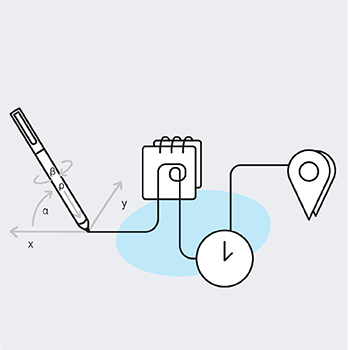
All versions of the plugin expose the same properties. Note, however, that only the professional Wacom tablets (Intuous, Cintiq) support all properties. Unsupported properties return a zero value.
|
Property |
Type |
Default
Value |
Description |
Supported Tablets |
|
isEraser |
BYTE |
0 |
TRUE
if the last-seen packet came from an eraser, FALSE otherwise. |
Consumer,
Professional |
|
isWacom |
BYTE |
1
(connected) 0
(not connected) |
TRUE if
the object is attached to a Wacom Wintab, FALSE otherwise. |
Consumer,
Professional |
|
pointerType |
LONG |
0 |
0 = Out of Proximity 1 = Pen 2 = Mouse (also known as 'puck') 3 = Eraser |
Consumer,
Professional |
|
posX |
LONG |
0 |
The
last-seen packet's X position in pixel coordinates. |
Consumer,
Professional |
|
posY |
LONG |
0 |
The
last-seen packet's Y position in pixel coordinates. |
Consumer,
Professional |
|
pressure |
FLOAT |
0.0
(connected) 1.0
(not connected) |
The last-seen
packet's pressure, in the range [0.0,1.0]. |
Consumer,
Professional |
|
rotationDeg |
FLOAT |
0.0 |
The
last-seen packet's rotation value in degrees. |
Professional |
|
rotationRad |
FLOAT |
0.0 |
The
last-seen packet's rotation value in radians. |
Professional |
|
sysX |
FLOAT |
0.0 |
The
last-seen packet's X position in pixel coordinates (to sub-pixel resolution). |
Consumer,
Professional |
|
sysX |
FLOAT |
0.0 |
The
last-seen packet's Y position in pixel coordinates (to sub-pixel resolution). |
Consumer,
Professional |
|
tabX |
LONG |
0 |
The last-seen packet's X position in tablet
coordinates. |
Consumer,
Professional |
|
tabY |
LONG |
0 |
The
last-seen packet's Y position in tablet coordinates. |
Consumer,
Professional |
|
tangentialPressure |
FLOAT |
0.0 |
The
last-seen packet's tangential pressure value, in the range [0.0,1.0] |
Professional |
|
tiltX |
FLOAT |
0.0 |
The
last-seen packet's X tilt value, in the range [-1.0, 1.0]. |
Professional |
|
tiltY |
FLOAT |
0.0 |
The last-seen
packet's Y tilt value, in the range [-1.0, 1.0]. |
Professional |
|
version |
LONG |
<plugin version> |
The
version of the plugin in decimal form (eg: 1.1.0.1 is reported as 1101). |
Consumer,
Professional |